Apple’s new Audio Intelligence features do two specific things. Live Rewind shows the last 15 seconds of a conversation as text when you double-press the Digital Crown, and Siri Recap writes high-level summaries of your day’s conversations into the Siri app. Both are limited to Apple Watch Series 12 and Ultra 4, both arrive in beta later in 2026, and neither one keeps a full transcript.
My take: Apple has just validated the idea that a device on your body should help you remember what was said, and the privacy engineering behind it is genuinely good. But Live Rewind is a 15-second safety net and Siri Recap is a summary that deletes itself after a week. If what you need is the whole conversation — searchable months later, with the commitments pulled out and handed to the AI tools you already use — that is a different job, and it is the one Fieldy was built for.
Live Rewind rescues a sentence. Siri Recap summarises a conversation. Neither keeps the conversation.
Apple is solving the “what did they just say?” problem, elegantly and privately, on its two newest watches. A dedicated wearable AI note taker is solving a different one: keeping the conversation as a durable, searchable record and turning what was said into tasks, reminders, and context your other AI tools can work with.
What is Live Rewind on Apple Watch?
Live Rewind is built for the moment when someone says something important and you realise — a few seconds too late — that you missed it.
Deliberately double-press the Digital Crown and the watch shows a text snippet of the previous 15 seconds of speech. From there you can ask Siri about it or save it to the Siri app.
If you do neither, the snippet clears itself. Apple says the text disappears from the watch roughly 30 seconds after the display dims.
That is the whole feature, and the tight scope is the point. It is a safety net, not a notebook.
What is Siri Recap?
Siri Recap goes further. When you turn it on, it ambiently takes notes on conversations through the day and generates Apple Intelligence summaries you can revisit in the Recaps tab of the Siri app.
Three details matter for anyone deciding whether it covers their needs:
- It produces high-level summaries comparable to conversation notes, not full transcripts.
- Summaries auto-delete after 7 days unless you save or export them.
- It is opt-in, and you control when it is scheduled to run.
It is a small feature on paper. But it represents a much bigger shift in how we use AI, and it is worth understanding why.
Which Apple Watch models get Live Rewind and Siri Recap?
This is the constraint most coverage buries: Audio Intelligence is an Apple Watch Series 12 and Apple Watch Ultra 4 feature only.
The processing runs inside the Secure Exclave on the S11 chip, and older watches do not have it. A Series 10 or an Ultra 2 can install watchOS 27 and get the Siri AI beta, but it will not get Live Rewind or Siri Recap.
watchOS 27 with the Siri AI beta shipped on 14 September 2026. Apple says Live Rewind and Siri Recap themselves arrive in beta later in 2026, in English first, and that they are unavailable to users under 13, with parental approval required for ages 13 to 17.
What Apple does with the audio
Apple has approached this carefully, and it deserves credit for it.
The company says audio is not recorded or stored by these features. Raw audio is routed into a hardware-isolated compartment built into the silicon — the Secure Exclave — and is not accessible to Apple or to third-party apps. Summaries you save sync end-to-end encrypted through iCloud.
If ambient listening on a watch makes you uneasy, that architecture is the right answer to the right question.
Why conversation is becoming the next input for AI
Over the last few years, AI has quietly become part of the daily workflow for millions of professionals. It summarises meetings, drafts emails, searches documents, turns rough ideas into structured plans, identifies action items, and helps people make sense of enormous amounts of digital context.
There is a simple reason all of that feels normal now: most modern knowledge work already leaves a digital trail. Emails are searchable. Meetings happen on Zoom or Teams. Documents live in the cloud. Calendars know where you are supposed to be.
But there has always been a major blind spot. Real life.
Some of the most important information in your day never enters a computer.
It happens across a table. In a customer meeting. Walking through a construction site. Over coffee with a colleague. In a hallway five minutes after the official meeting ended.
Someone shares an idea. A customer reveals why they are really hesitant. A colleague mentions a problem nobody has written down yet. You promise to follow up next Thursday.
And then everyone walks away, and the conversation disappears.
That is what makes Live Rewind and Siri Recap so interesting. Apple is effectively acknowledging that our devices should not only understand what happens on our screens. They should also help us understand what happens around us.
Apple is not the first company to see that opportunity. Specialised AI wearables have spent years working on a bigger version of the same problem. And that is where things get interesting.
What if AI remembered more than the last 15 seconds?
Fieldy was built around a simple idea: important conversations should not disappear just because they happened away from a laptop.
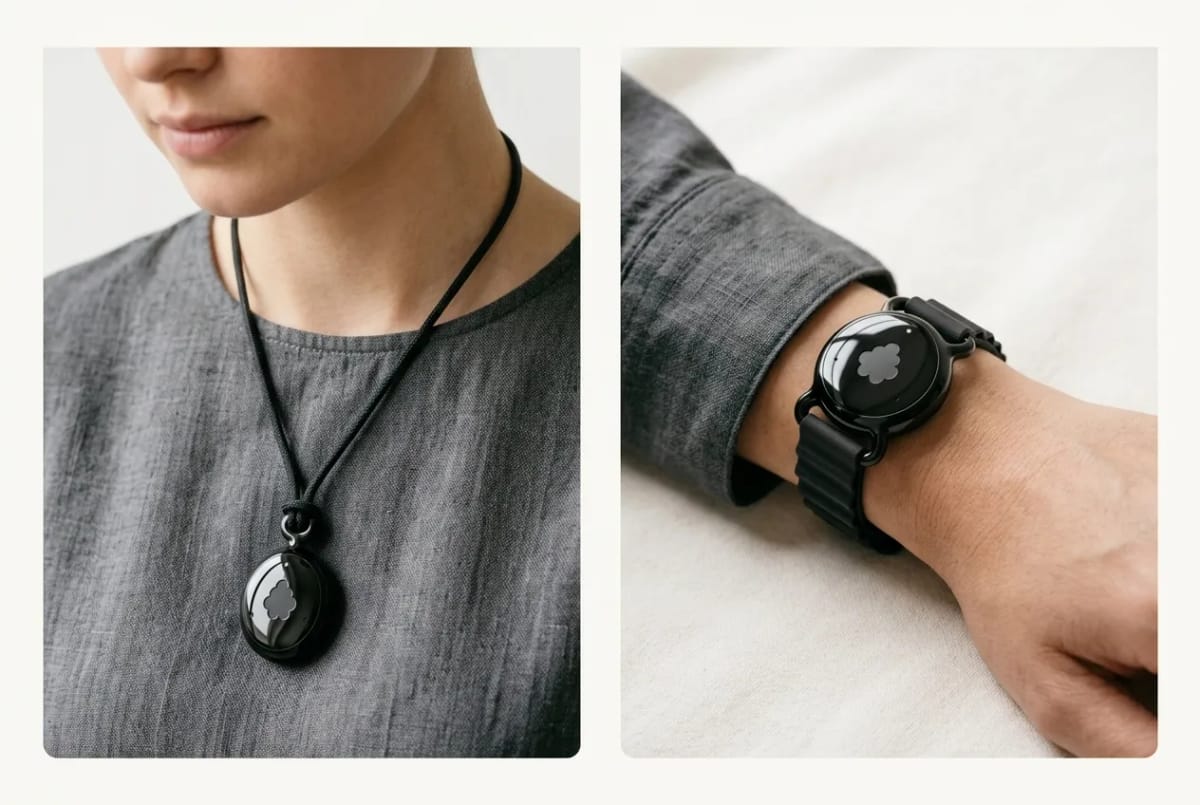
Worn as a pendant or on the wrist, Fieldy 3 creates a searchable record of a conversation rather than a snippet you have 30 seconds to rescue. It identifies tasks and reminders instead of only handing you a recap. And it makes that real-world context available to the AI tools and workflows you already use, rather than trapping it in one more isolated notes app.
There are two capture modes, and the difference matters. Start & Stop gives you explicit control over which conversations are captured, with better transcription accuracy and speaker profiles. Always-On, included with the Unlimited plan, keeps recording through the day and splits conversations automatically, so you are not deciding at the start of every exchange whether it is worth capturing.
Apple’s Live Rewind is designed to help you retrieve something you just missed. Fieldy is designed to help you work with what happened afterwards.
Siri Recap vs Fieldy: what each one keeps
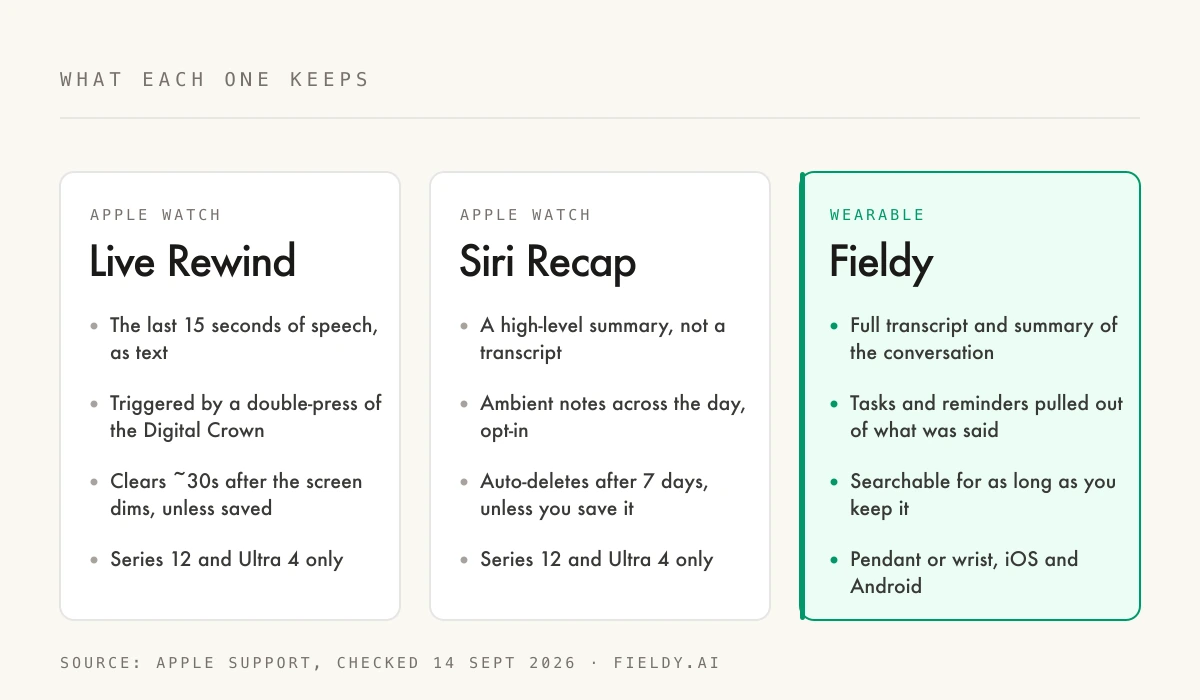
| Live Rewind | Siri Recap | Winner Fieldy | |
|---|---|---|---|
| What you get back | Last 15 seconds, verbatim text | High-level summary, no transcript | Full transcript and summary |
| How long it is kept | ~30 seconds unless saved | 7 days unless saved | Until you delete it |
| Tasks and reminders | No | No | Yes |
| Searchable across months | No | No | Yes |
| Works with ChatGPT, Claude, Cursor | No | No | Over MCP |
| Hardware needed | Apple Watch Series 12 / Ultra 4 | Apple Watch Series 12 / Ultra 4 | Fieldy 3 pendant or wrist |
| Phone platforms | iPhone only | iPhone only | iOS and Android |
| Availability | Beta later in 2026 | Beta later in 2026 | Shipping now |
Remembering is useful. Doing something with the memory is better.
A transcript by itself is useful. A summary is better. But what most professionals actually need is an answer to a different question: what should happen next?
Imagine finishing a customer meeting. Pricing is the biggest concern. They asked for a revised proposal. You promised to send it on Friday. They mentioned a second stakeholder who needs to approve the deal.
With traditional note-taking, you have to remember all of that, write it down, move the follow-up into another app, and later explain the context all over again to whichever AI tool you use.
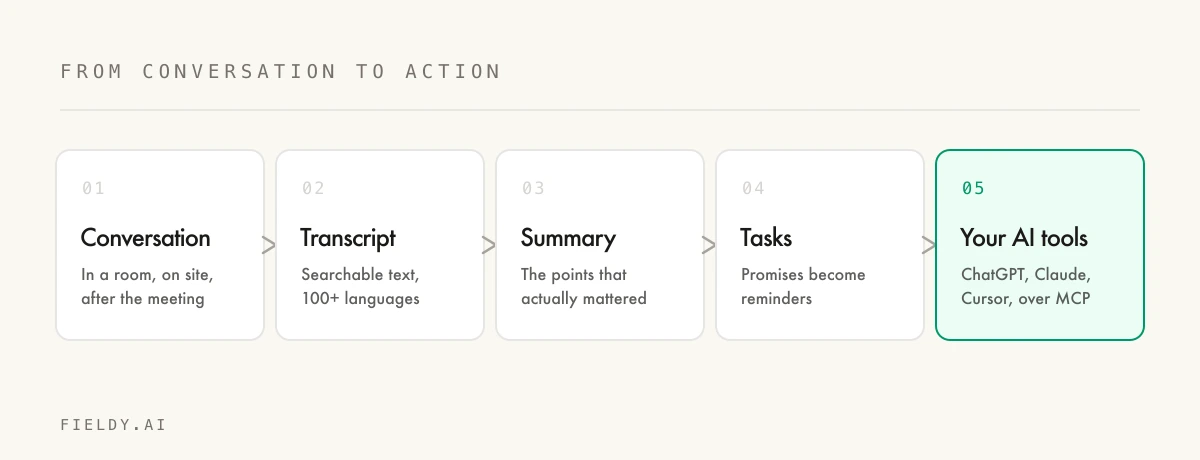
With Fieldy, that conversation becomes structured context: a transcript, a summary, an action item, a reminder, something searchable weeks later — and increasingly, something your other AI tools can work with directly.
Can your real-world conversations become AI context?
Yes, and this is the part that changes what the category is for. The intelligence does not have to end inside the note-taking app.
Through MCP — the Model Context Protocol — Fieldy can expose your conversation context to compatible AI tools. There are one-click connectors for Claude and ChatGPT, plus Cursor and other MCP clients through the Fieldy developer platform.
That means you can ask an assistant things like:
- “What did I promise that customer yesterday?”
- “Find every conversation where we talked about the new pricing strategy.”
- “What objections did customers mention this month?”
- “Turn my meetings from this week into a list of follow-ups.”
The model is not working from a summary you manually pasted into a chat. It retrieves the relevant Fieldy context directly once you authorise the connection.
The connected-service side goes further still. Fieldy works with Gmail, Google Calendar, Microsoft Outlook, Apple Reminders, and Google Tasks, so depending on what you ask and what you have connected, the assistant can use email and calendar context, prepare drafts, create or update events, and push commitments into your task app.
That moves AI from “here is what happened” to “here is what happened — and now let’s do something about it.”
Connecting the dots you would not connect yourself
There is another consequence of giving AI access to real-world context: individual conversations stop being isolated events.
Imagine talking to ten customers over several weeks. One mentions a problem and you do not think much of it. Three days later, someone else describes the same problem in completely different words. A week after that, another customer hints at it again.
As a human, you would probably never connect those three conversations. They happened on different days, in different places, with different people.
A system with searchable access to that history can start surfacing the pattern. Which objections keep appearing? Which promises have not been completed? What did you tell this person the last time you met them? Which decisions from a month ago affect the conversation you are having today?
This is where the idea of an AI second brain starts becoming genuinely useful — not because it records everything for the sake of recording it, but because it turns scattered moments into usable context.
The laptop should not be where AI begins and ends
For years, AI has been extraordinarily powerful as long as the information it needs already exists on a screen.
But people do not live entirely on screens. We sell in the real world. We manage people in the real world. We visit job sites, attend conferences, walk factory floors, sit in classrooms, interview candidates, and make decisions over lunch.
The next generation of personal AI needs context from both worlds: digital and physical. Emails and conversations. Documents and decisions. Calendars and commitments.
Apple bringing Live Rewind and Siri Recap to Apple Watch is a strong signal that the transition has begun. Conversation itself is becoming a new input for AI. Once conversation becomes usable data, the possibilities get much bigger than remembering the last thing someone said.
Siri Recap is the beginning, not the destination
Apple’s entrance into this category is exciting because it validates a simple idea: people want technology that helps them remember.
But memory is only the first step. The bigger opportunity is turning memory into intelligence, and intelligence into action. Capture what happened. Understand what matters. Remember it later. Turn commitments into tasks. Connect conversations across days, weeks, and months. And make that context available to the AI tools that can help you actually get the work done.
So if Live Rewind or Siri Recap caught your attention, there is already a way to take the idea considerably further — on any phone, without waiting for a beta, and without a 7-day expiry on your own memory.
Fieldy 3 is $129 during the Anniversary Sale, down from $179.
Full transcripts and summaries, tasks and reminders pulled from what was said, searchable for as long as you keep it, and connected to ChatGPT and Claude over MCP. Ships with a 14-day money-back guarantee and a 1-year warranty.
Apple is teaching millions of people that their watch can help them remember a conversation. Fieldy is built around what happens next.
FAQ
What is Live Rewind on Apple Watch?
Live Rewind shows the last 15 seconds of speech as text on your Apple Watch when you deliberately double-press the Digital Crown. The snippet clears itself roughly 30 seconds after the screen dims unless you save it to the Siri app or ask Siri about it.
What is Siri Recap and how is it different from Live Rewind?
Siri Recap ambiently takes notes across your day and writes high-level summaries into the Recaps tab of the Siri app. Live Rewind answers 'what did they just say' in the moment; Siri Recap answers 'what mattered in that conversation' afterwards.
Which Apple Watch models support Live Rewind and Siri Recap?
Apple lists Audio Intelligence as an Apple Watch Series 12 and Apple Watch Ultra 4 feature, because it runs on the S11 chip's Secure Exclave. Older watches can install watchOS 27 but do not get Live Rewind or Siri Recap.
Does Siri Recap record audio?
Apple says audio is not recorded or stored by these features. Raw audio is processed inside a hardware-isolated compartment in the silicon, and saved summaries sync end-to-end encrypted through iCloud, so Apple and third-party apps cannot access them.
How long does Siri Recap keep a summary?
Summaries auto-delete after 7 days unless you save or export them. That makes Siri Recap a short-term memory aid rather than a durable, searchable record of what was said.
Does Siri Recap give you a full transcript?
No. Apple describes Siri Recap as producing high-level summaries comparable to conversation notes, not full transcripts. Live Rewind is the only part that shows verbatim text, and only for the previous 15 seconds.
When are Live Rewind and Siri Recap available?
watchOS 27 with the Siri AI beta shipped on 14 September 2026. Apple says Live Rewind and Siri Recap arrive in beta later in 2026, in English first, and they are unavailable to users under 13.
What is the difference between Siri Recap and Fieldy?
Siri Recap gives you an Apple-generated summary that expires in 7 days on two specific watches. Fieldy keeps the full transcript and summary, extracts tasks and reminders, stays searchable for as long as you keep it, and exposes that context to ChatGPT, Claude, and other MCP clients.
Sources checked
Checked on 14 September 2026.
- Apple Support, “About Audio Intelligence features on Apple Watch Series 12 and Apple Watch Ultra 4” — supported models, Live Rewind behaviour and retention, Siri Recap summaries and 7-day auto-delete, Secure Exclave and encryption, beta timing, English-only and age limits.
- Fieldy pricing, capture modes, and integrations verified against fieldy.ai and the memberships page on the same date.